
Spyware
Known spyware by name and by signature, and hidden apps that can read your messages, location or microphone.
Horus Shield checks your Android phone for spyware, fake banking apps and dangerous links. The scan runs on the phone itself and takes under a minute.

The threats people in Egypt actually run into: apps installed behind your back, copies of bank and wallet apps, and links sent over WhatsApp.
Known spyware by name and by signature, and hidden apps that can read your messages, location or microphone.
Apps that carry a bank's or wallet's name but did not come from the store, and apps that can read your OTP codes.
Share a link from WhatsApp and see where it really leads, how old the site is, and whether it pretends to be someone else.
Every 6, 12 or 24 hours in the background. You get an alert only when something new and important shows up.
It also checks your screen lock, security updates, developer options, certificates added by hand, proxies and DNS.
Horus Shield is not on Google Play yet, so Android asks you to allow the install once.
Horus Shield is for Android only. There is no iPhone version.

Horus Shield runs on Android phones. Scan this code with your phone's camera to open this page there, then tap Download.
Open this page on your Android phone and tap Download. The file is called HorusSec-Mobile.apk.
Open the file. If Android asks, turn on “Allow from this source” for your browser, then go back.
Play Protect may warn you because the app is not from the store. Tap More details, then Install anyway.
Open Horus Shield and tap Scan device. Updates arrive inside the app, with a notification.
BD:3B:D3:05:0E:ED:79:72:EF:A5:84:54:C8:C3:13:2C:A5:A7:3D:A9:92:6F:6D:7A:DA:4F:5E:51:42:8C:51:67A full run through the app, recorded on a real Android phone: a scan, the report, a suspicious link, then your past reports and settings.
The scan reads your apps, permissions and settings, and finishes in under a minute.
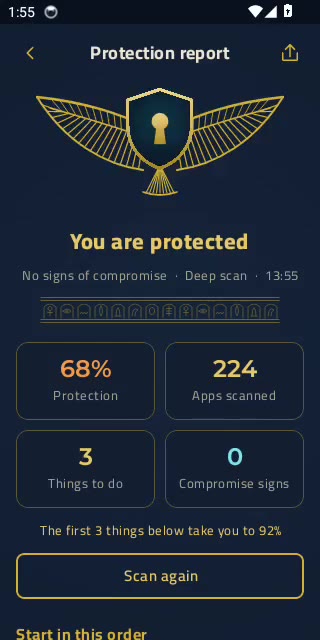
The verdict comes first, then your protection score and the things to do, most important first.
Each item explains why it matters and opens the right Android setting for you.
Paste a link in Tools › Link check, or share it straight from WhatsApp to Horus Shield.
In Settings, choose every 6, 12 or 24 hours and keep security alerts on.
After each scan you get one of three answers, then a short list of things to do.
No spyware or fake apps were found. The report still lists settings that would make the phone stronger.
An app or setting looks unusual. Each item says why it matters and opens the right setting.
Read the guidance before deleting anything. If you feel at risk, save the summary and ask someone you trust for help first.

The app list, permissions, settings and scan results are read and scored on your phone and never sent to a server. There is no account, no ads and no tracking.
Horus Shield never deletes or changes anything on its own. Every action waits for you.
Horus Shield is in its first public phase. Until it reaches the store, download it only from this site, where every build is signed by Horus ICT.
No. Everything works on a normal phone. On phones that are already rooted there is an optional expert mode that looks deeper. Do not root your phone to try it.
No. It looks at which apps are installed, what they are allowed to do and how the phone is set up.
Whoever installed it will notice if it disappears. If you feel at risk, save the summary from the report and get help from someone you trust before you delete it, then change your Google password from another device.
Horus Shield checks for new versions and shows a notification. Tap it, then Download and update. Your settings and results are kept.
English, Modern Standard Arabic and Egyptian Arabic. Change it any time from Settings › Language.